Register as a Niki Live agent, invite hosts and other agents, and manage your network from the in-app agent menu to track activity and earn commissions.
Online agent registration · Hosts and agents · Agent menu · Earn commissions
On this page
Why become a Niki Live agent?
Niki Live is a social live-streaming app with an international audience. As an agent, you can invite hosts and bring in new agents to earn commissions from the activity generated by your network.
- International app reach: connect users, hosts, and live rooms from different countries.
- Two-way growth: invite both hosts and new agents.
- Network-based commissions: earn from the activity generated by the hosts and agents linked to your network.
- From 4% to 20%: commissions increase based on your team’s level and performance.
Agent requirements
To register as a Niki Live agent, you only need a mobile phone, an internet connection, and an active account in the app. The process is completed with your user ID, a simple verification, and the agent form.
- Mobile phone: the app is installed and used from your phone.
- Internet connection: required to register and receive the verification code.
- Niki Live account: you must create or already have an active user account.
- User ID: copy it from your profile to complete the form.
- Verification: confirm the code requested by the app.
How to register as a Niki Live agent
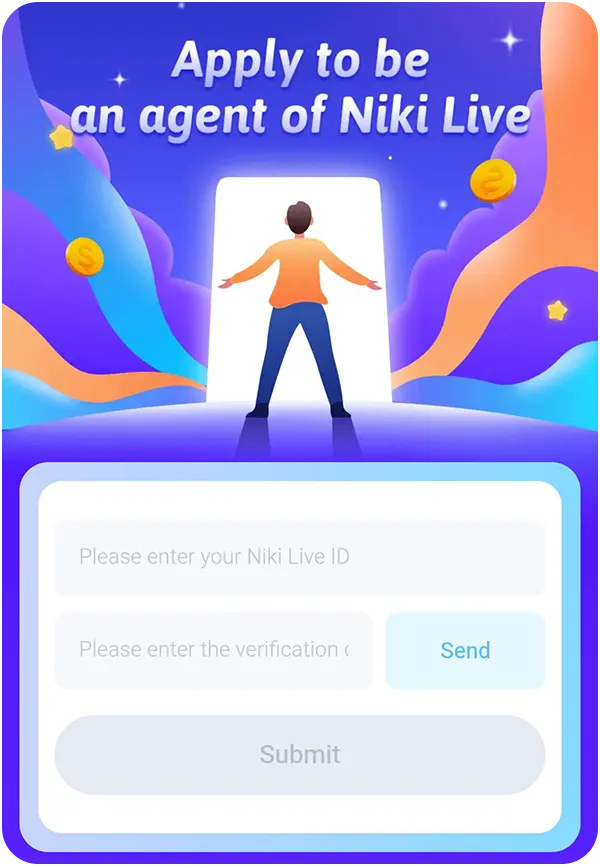
Agent registration is completed through the invitation form. Just copy your Niki Live user ID, request the verification code inside the app, and submit it to activate your account as an agent.
- Copy your user ID
- Open Niki Live, go to your profile, and copy your account ID.
- Paste the ID into the form
- Enter it in the agent registration field.
- Request the code
- Press Send to receive the verification code.
- Check official messages
- Look for the code in Official Message inside the app.
- Submit your registration
- Enter the code you received and press Submit.
After submitting the form, your account is enabled as an agent and you can manage your network from the app.
Agent menu in the app
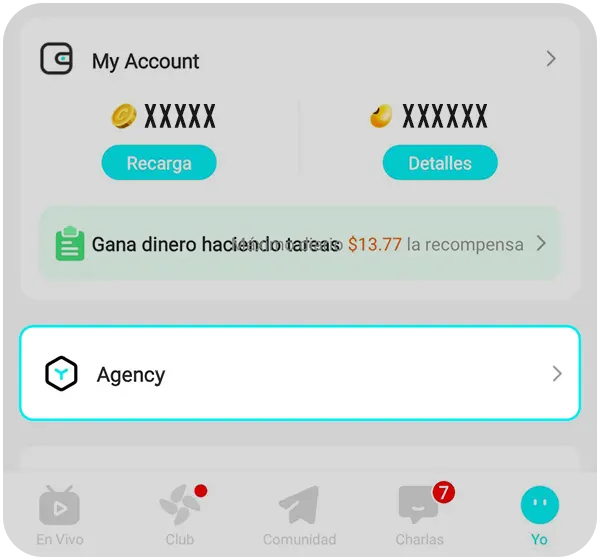
After activating your account as an agent, management is handled from the Agency option inside the Niki Live app. From this agent menu, you can add hosts, invite other agents, review your network activity, and check your commission percentage.
- Access from your profile: go to Me and tap the Agency option.
- Hosts: add and review the hosts linked to your network.
- Invited agents: invite other agents to expand your team.
- Activity: check weekly income and performance.
- Commissions: review your current percentage and progress toward the next level.
Agent commissions
As a Niki Live agent, you can earn commissions based on your network’s performance. The app evaluates performance every week and assigns a level based on the activity generated by your hosts and invited agents.
| Level | Weekly performance | Commission |
|---|---|---|
| D | Less than 500k | 4% |
| C | 500k to 2,000k | 7% |
| B | 2,000k to 11,000k | 11% |
| A | 11,000k to 30,000k | 14% |
| S | 30,000k to 65,000k | 18% |
| SS | 65,000k or more | 20% |
- Weekly level: the more performance your network generates, the higher your commission percentage can be.
- Hosts and invited agents: performance may include activity from linked hosts and agents.
- Payment and withdrawal: commissions are sent to the primary agent’s wallet and can be withdrawn from the app.
Note: performance may include income from gifts, games, voice chat, and video chat. Special tasks or rewards may not count toward commission.
Niki Live agent guides
How to add hosts on Niki Live
Learn how to invite and manage hosts from the agent menu.
How to invite agents on Niki Live
Discover how to invite other agents, grow your network, and earn from your team’s performance.
Rules for agents
To keep your agent account active on Niki Live, you must follow up with the hosts in your network, meet the minimum activity requirements, and respect the platform rules. The app may review your network’s performance and send notices if you need to improve.
- Keep hosts active: your network must maintain at least 5 active hosts.
- Weekly activity: an active host must stream more than 6 hours per week.
- Minimum performance: over the last 4 weeks, the highest weekly commission must not be lower than 50,000 Gold Beans.
- Improvement notices: if your network does not comply, the platform may send reminders before applying changes.
- Avoid violations: fraud, spam, illegal content, or repeated violations may affect your agent account.
- Protect your network: if an agent’s network is closed, hosts may become independent or join another agent’s network.
Note: rules may be updated inside Niki Live. Always review the app’s notices and official messages.
Frequently asked questions
-
How do I register as a Niki Live agent?
Open the agent form, enter your user ID, request the verification code, and press Submit to activate your account as an agent.
-
Where do I find my user ID?
Your ID appears inside your profile in the Niki Live app. Copy that number and use it in the registration form.
-
Where will I receive the verification code?
The code arrives inside the app, in Official Message or official messages. After pressing Send, check that section.
-
Is agent management handled from a web dashboard?
No. In Niki Live, management is handled from the app by opening the Agency option inside your profile.
-
Can I invite hosts and other agents?
Yes. As an agent, you can link hosts to your network and invite new agents to expand your team.
-
How much does a Niki Live agent earn?
Commissions range from 4% to 20%, depending on the weekly level and the performance generated by your network.
-
What do I need to keep my agent account active?
You must keep hosts active, follow up with your network, and meet the minimum activity and performance requirements.
-
Where do I receive my commissions?
Commissions are sent to the primary agent’s wallet inside the app, where you can review the balance and request an available withdrawal.